Most speed advice is about the front end: images, scripts, fonts. It all assumes the HTML has arrived. If the server takes two seconds to answer, the browser spends them with nothing to do, and no image compression gets them back.
That wait is Time to First Byte, or TTFB. It's not a Core Web Vital itself, but it sits underneath all of them.
What's inside the number
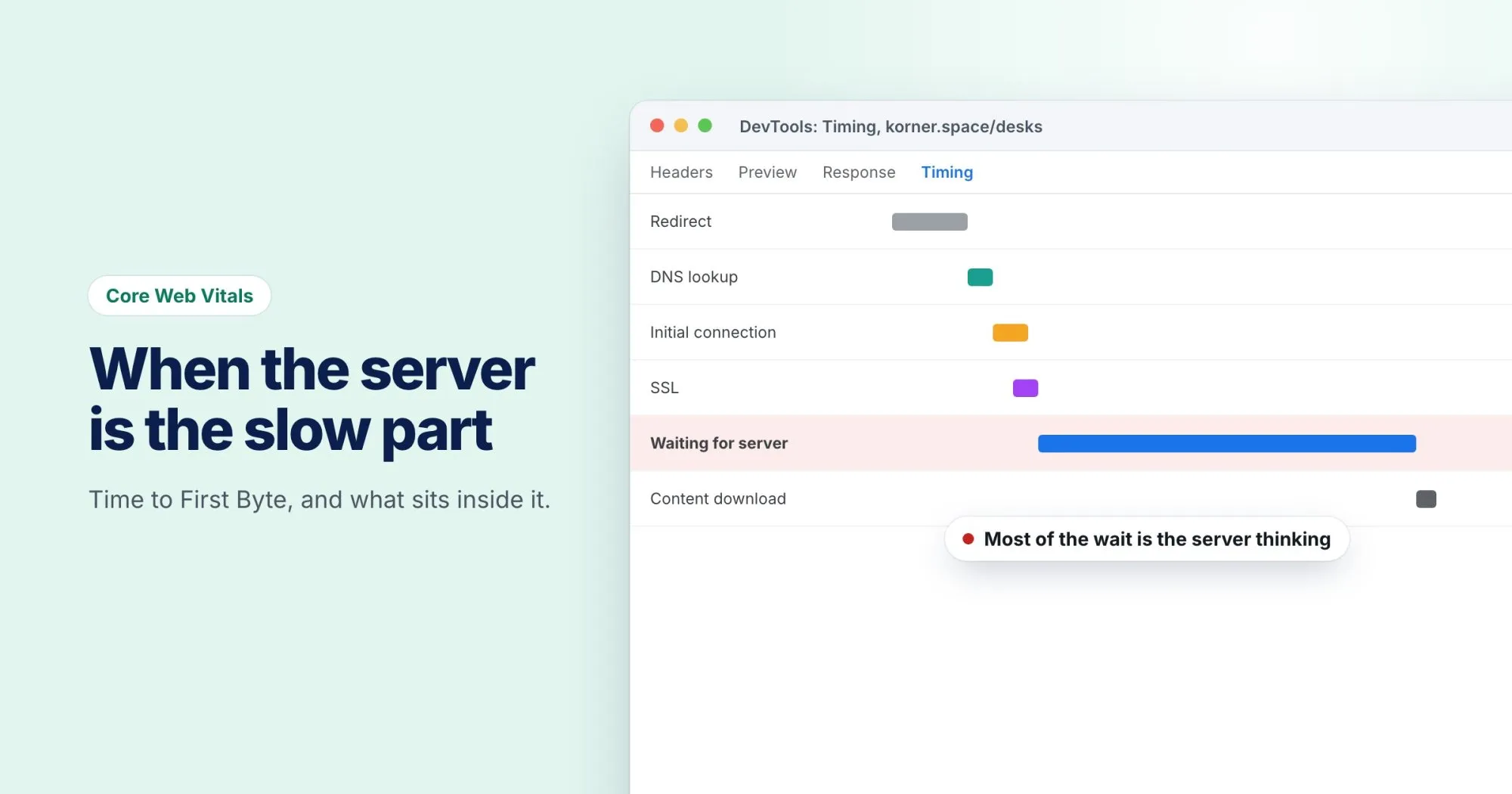
TTFB is measured from the moment the browser starts navigating to the moment the first byte of the response arrives. That covers more than people expect:
- Redirects. Every hop before the final URL counts.
- DNS lookup. Turning the hostname into an address.
- Connection. The TCP handshake, or the QUIC one on HTTP/3.
- TLS negotiation. Setting up the secure connection.
- Server think time. Your application running, querying the database and building the page.
When TTFB is high, work out which stage it is first, because the fixes are completely different.
Why it holds back LCP
Largest Contentful Paint can't happen before the HTML arrives, and the browser can't discover the hero image until it has read the HTML that points to it. So every millisecond of TTFB lands on LCP too. If TTFB is most of a poor LCP, the front end isn't the problem. (The LCP post covers the other parts.)
What good looks like
Google's guidance on web.dev is that most sites should aim for a TTFB of 0.8 seconds or less, and treats anything over 1.8 seconds as poor. It's a rough guide: a site that renders on the client can have a fast TTFB and still show nothing for a while.
For a sense of scale, our report on onbixo.com/pricing measured a 414 ms time to first byte: comfortably inside the target, and a solid start for everything that loads after it.
Measuring it
In Chrome DevTools, open the Network panel, reload, click the document request and open the Timing tab. "Waiting for server response" is the server think time, and the rows above it show DNS, connection and TLS separately.
From the command line, curl can break it down for you:
curl -o /dev/null -s -w "dns:      %{time_namelookup}s
connect:  %{time_connect}s
tls:      %{time_appconnect}s
ttfb:     %{time_starttransfer}s
total:    %{time_total}s
" https://korner.space/shoes
Each figure is measured from the start, so subtract to get the size of each stage. If ttfb is far bigger than tls, the time is going on the server. Run it a few times, since the first request often hits a cold cache.
Bringing it down
Cache the page. The fastest response is one your application doesn't have to build. A shoe category on korner.space is the same for two visitors, so a full-page or edge cache can answer without touching PHP or the database.
Put a CDN in front. A CDN cuts connection and TLS time by answering from a location near the visitor, even for pages it can't cache.
Find the slow queries. When think time dominates, it's usually the database. Turn on the slow query log, look for queries that run once per item in a list, and add missing indexes.
Remove redirect hops. Linking to the final URL instead of one that redirects removes a whole round trip. Our post on redirect chains shows how to find them.
Send early hints. A 103 Early Hints response lets the server tell the browser which stylesheet or font to fetch while it's still building the page. Chrome supports it, and several CDNs can send it for you. It doesn't lower TTFB itself, but it puts the waiting time to use.
Where it shows up in a report
Every WebRankPage report puts the page's TTFB in its header and checks it against the same 800 ms and 1,800 ms bands. When Google has enough real-user data for the page, the Speed & delivery section adds the TTFB that real visitors see, which is the number worth watching after a change goes live.