A sitemap is a list of promises. Every URL in it says: this page exists, it's the version I want in search results, and it's worth your time. Search engines read it that way, and when a sitemap is full of pages that don't keep those promises, they learn to trust it less.
Most of the sitemaps I open were generated by a plugin years ago and never looked at again. They usually work. They're also usually full of things that shouldn't be there.
The rule for every URL
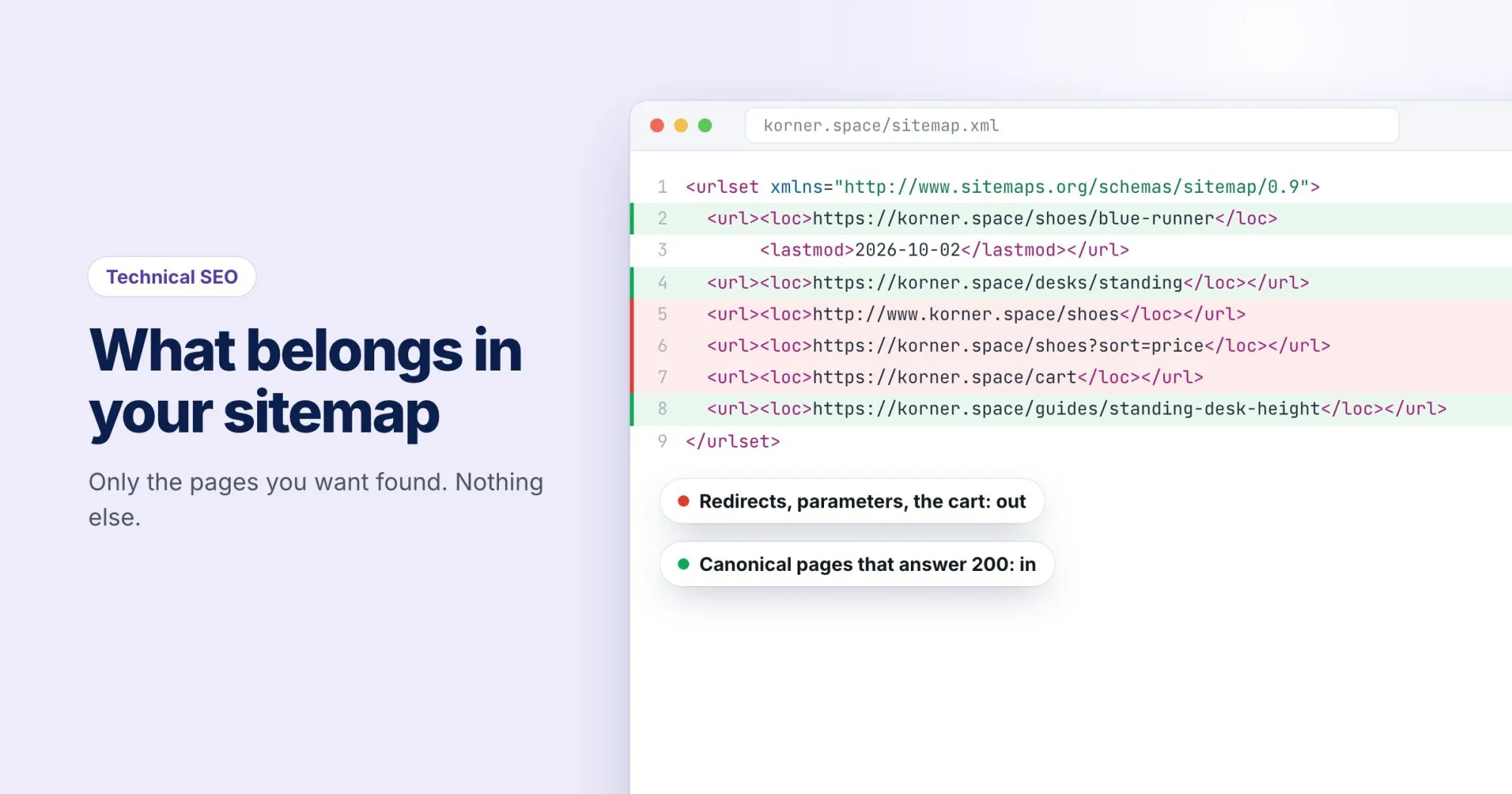
A URL belongs in your sitemap only if all three of these are true:
- It answers 200 OK. Not a redirect, not a 404, not a login wall.
- It's indexable. No
noindexin the page or its headers, and not blocked in robots.txt. - It's the canonical version. If the page declares a different URL as canonical, list that one instead.
That one rule rules out most of the common mistakes at once.
What usually sneaks in
- Redirected URLs. Old addresses left in after a restructure. List the destination, never the redirect. (If those redirects have stacked up, this post on redirect chains covers collapsing them.)
- Noindex pages. Thank-you pages, internal search results, tag archives you deliberately kept out of the index. Listing them sends two opposite signals about the same page.
- Parameter URLs. On korner.space,
/shoes?sort=priceand/shoes?color=blueare views of/shoes. Only/shoesgoes in the sitemap. - Staging or test pages that a plugin picked up because they were published, even briefly.
Be honest with lastmod
The <lastmod> date is the most useful field in a sitemap and the most abused. Google has said it uses lastmod when it's consistently accurate, and ignores it when it isn't. A generator that stamps today's date on every URL every night teaches Google that your dates mean nothing.
Set lastmod when the content of the page meaningfully changes: new text, a new price, a corrected answer. A changed footer or a new copyright year doesn't count. Google also ignores <priority> and <changefreq>, so there's no need to agonize over them.
<url>
  <loc>https://korner.space/desks/standing-oak</loc>
  <lastmod>2026-09-28</lastmod>
</url>
Size limits and sitemap indexes
A single sitemap file can hold up to 50,000 URLs and be up to 50 MB uncompressed. Past either limit, split it into several files and list those in a sitemap index:
<sitemapindex xmlns="http://www.sitemaps.org/schemas/sitemap/0.9">
  <sitemap><loc>https://korner.space/sitemap-shoes.xml</loc></sitemap>
  <sitemap><loc>https://korner.space/sitemap-desks.xml</loc></sitemap>
</sitemapindex>
Splitting by section is worth doing even on smaller sites. When Search Console reports how many URLs from each file are indexed, a low number for one section tells you where to look.
Tell crawlers where it is
Add one line to robots.txt, with the full URL:
Sitemap: https://korner.space/sitemap.xmlThen submit it once in Search Console under Sitemaps. That report shows when Google last read the file and whether it could parse it. Google retired its old sitemap "ping" URL in 2023, so the robots.txt line and Search Console are the two places that count.
A five-minute check
Pick twenty URLs from your sitemap at random and run each through a status check like our free redirect checker. Anything that isn't a straight 200 is a promise your sitemap is breaking. A WebRankPage report also looks for your sitemap, under Crawling & indexing: whether it exists, whether it's valid XML, how many URLs it lists, and whether robots.txt points to it.