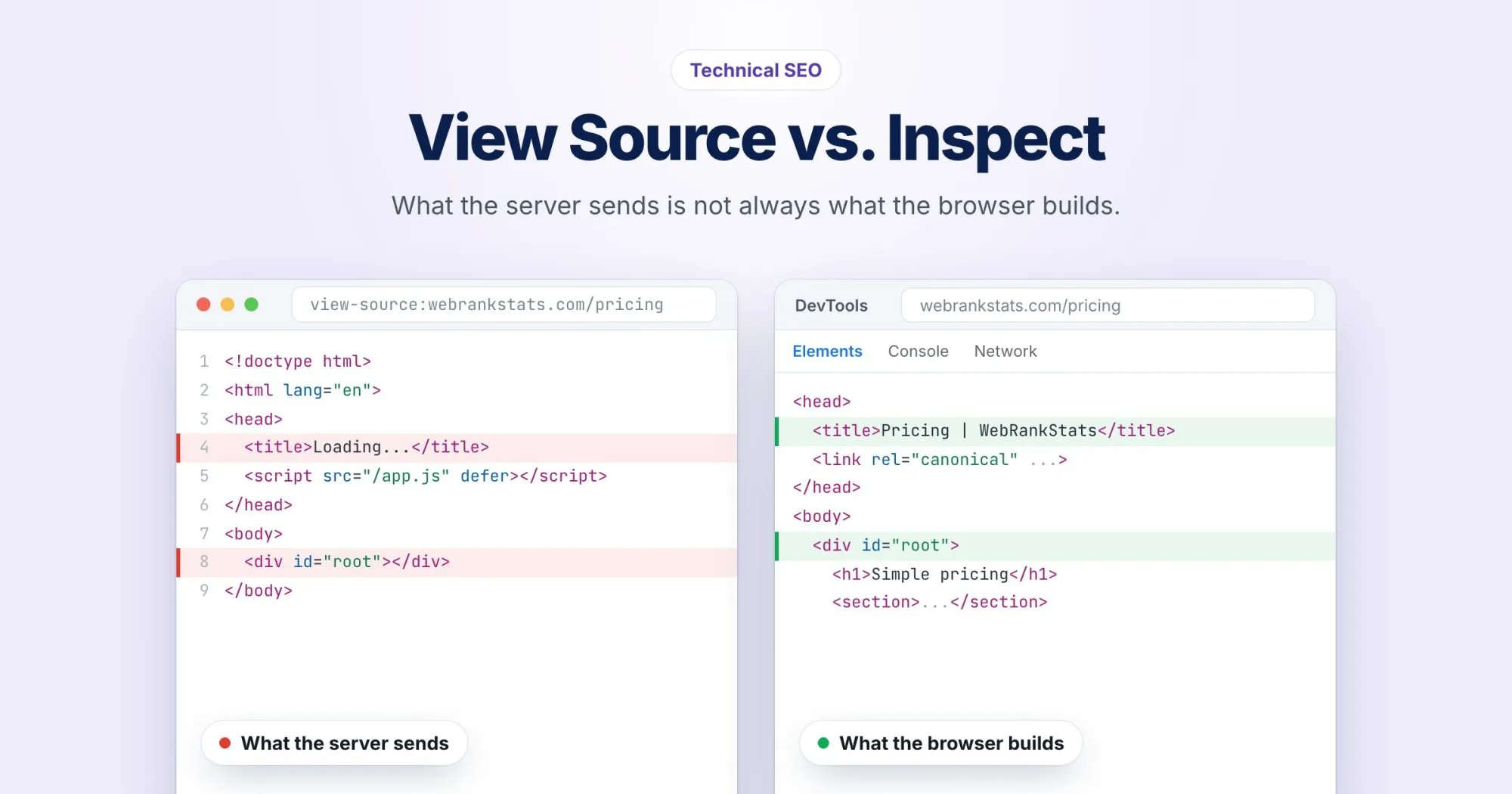
Here's a quick test I ask people to try. Open any page on your site, right-click, and choose View Page Source. Then right-click again and choose Inspect.
On a lot of modern sites, those two views don't match. Sometimes the difference is cosmetic. Sometimes the title, the main content, or half the internal links simply aren't in the source at all.
That gap is one of the most common reasons a page that looks perfect in a browser performs badly in search.
Two versions of every page
View Source shows the raw HTML: exactly what your server sent, before any JavaScript ran.
Inspect shows the DOM: the page as it exists right now in your browser, after every script has run, every component has mounted, and every API call has filled in its data.
If your site is server-rendered, the two are close. If it's built with a JavaScript framework that renders on the client, the raw HTML can be little more than an empty <div id="root"> and a script tag.
Why it matters for search
Google does render JavaScript. It fetches the raw HTML, queues the page for rendering, and later processes the rendered version. That works most of the time, but "later" can mean a delay, and rendering can fail quietly if a script errors or an API times out.
And Google isn't the only reader. Many other crawlers, social media preview bots, and a lot of AI tools only read the raw HTML. If your og:image is injected by JavaScript, LinkedIn will never see it. If your article text loads client-side, an AI assistant fetching your page may get nothing worth quoting.
A page is only as visible as its least capable reader.
What to check in the raw HTML
Open View Source and search (Ctrl+F or Cmd+F) for each of these:
- The
<title>tag, with the real title, not a placeholder like "Loading...". - The meta description.
- The canonical tag, pointing at the right URL.
- Your main heading and the first paragraph of real content.
- Navigation links as real
<a href>elements, not buttons with click handlers. - Structured data. JSON-LD added by a tag manager often exists only after rendering.
Or do it from the command line:
curl -s https://webrankstats.com/your-page | grep -i "<title"If the title comes back empty or generic, you've found your problem.
What to do about it
You don't need to rewrite your app. The usual fixes, roughly from least to most effort:
- Move SEO tags into the initial HTML. Most frameworks have a way to set the title, meta tags and canonical on the server even if the rest renders on the client.
- Use real links. An
<a href="/pricing">works for every crawler. A<div onclick>works for none of them. - Server-render or pre-render important pages. Your homepage, product pages and articles benefit most. A logged-in dashboard doesn't need it.
How we handle this in WebRankPage
This gap is exactly why every WebRankPage report looks at both versions. We fetch the raw HTML your server sends and keep it, then load the page in a real browser and audit what it becomes. When something important only exists after rendering, the report tells you, so you're not left guessing which version Google is judging.